GPX to GeoJSON - Free Online Data Converter
Looking for how to convert GPX data into GeoJSON format? Use this GIS data converter for free.
GPX data format is spatial data type mostly used in GPS devices to store your outdoor activity in the form of waypoints and tracks. Outdoor activity can be your fitness routine walking, running or hiking or may be some professional work like capturing coordinates of road signs, surveying fiber optic lines, pipelines, power electric infrastructure ets.
GPS devices are used by GIS professionals, and outdoor enthusiasts very commonly. Mostly GPS devices store the data in GPS exchange data format and GPX data format is one of them.
This absolutely free online web mapping tool helps you to convert you data retrieved from the GPS device to well known GIS data format geojson. Sample GPX Data to Download.
Geodata Converter Key Features:
User Guide: How to convert GPX to GeoJSON Step by Step Guide:
This guide will help you to use online GPX to GeoJSON free converter.
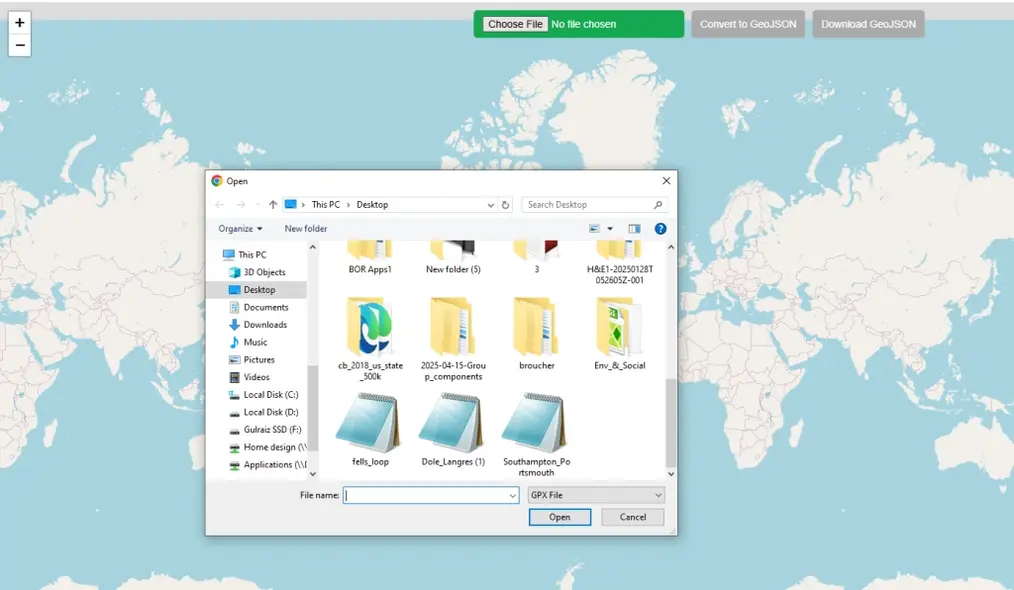
Step 1: Upload Data
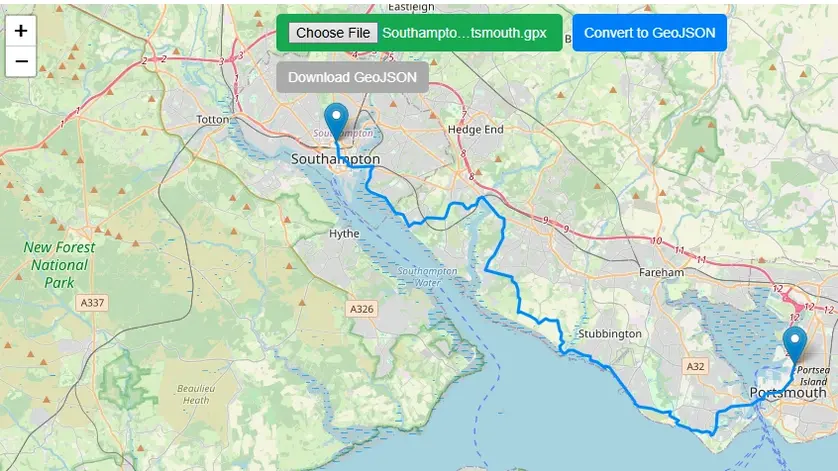
Click on green button on top of map to choose file. File browser will be opened, locate the GPX file in your local PC directory and open. This free online web mapping tool will read the spatial data automatically and zoom map to the extent of the data.
Step 2: Convert Data
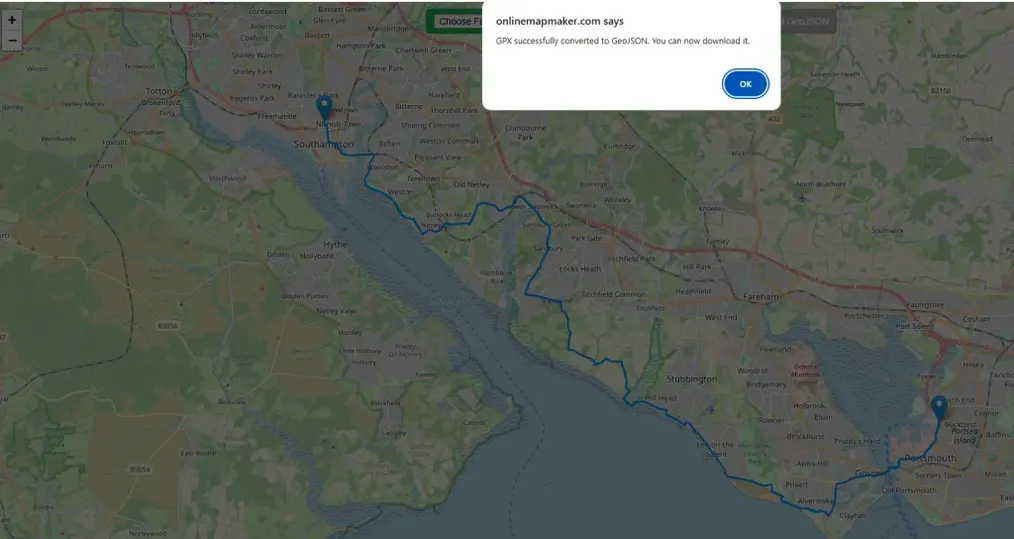
Once data is uploaded and displayed on map Convert to geoJSON button will be turned blue and active. Press the button and an alert will be popped up on top of the web browser, showing “GPX successfully converted to GeoJSON. You can now download it.”
Step 3: Download geoJSON
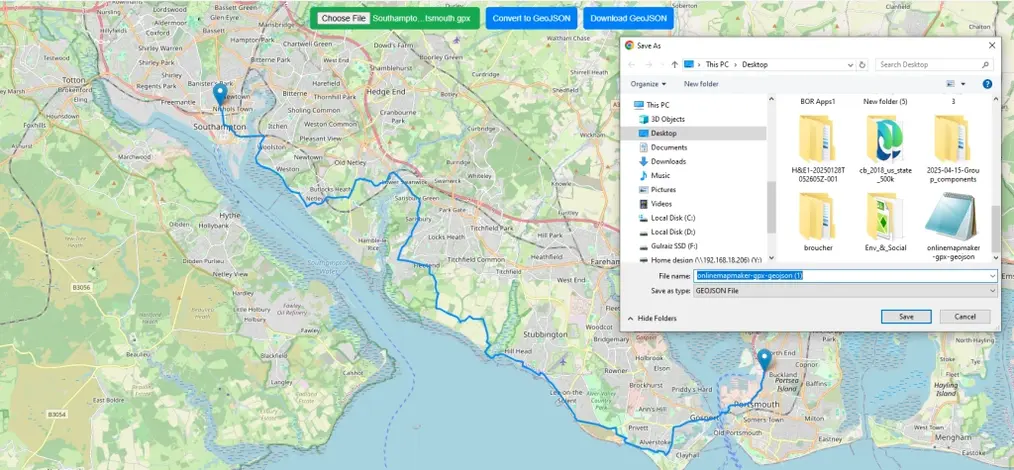
After converting the data “Download GeoJson” will be turned blue and activated. Simply click the button to download and save it to your computer.
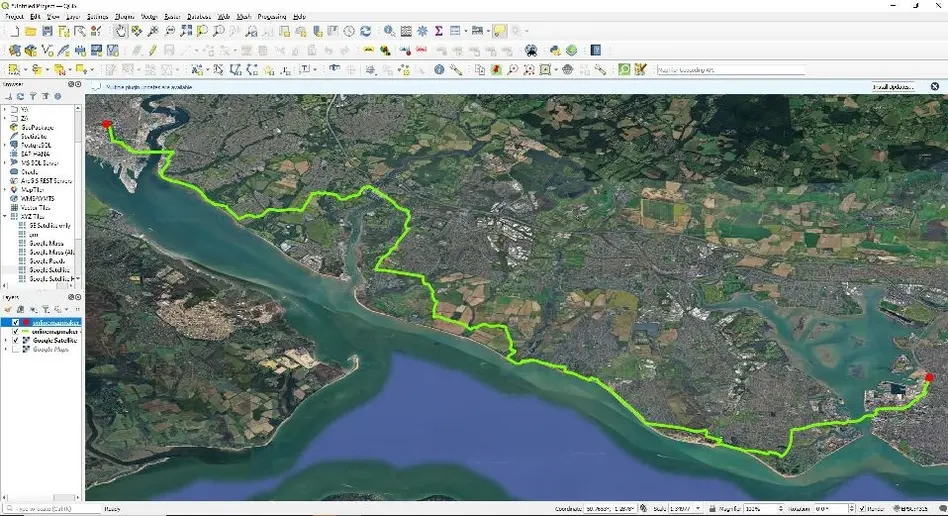
Now you can use and view this data in any GIS software like QGIS, ArcGIS etc.
A Brief History of the GPX File Format
Name: GPS eXchange Format (GPX)
Launch Date: The first version, GPX 1.0, was introduced in 2002.
Core Principle: It was an open standard, freely available for anyone to use without royalties or restrictions.
Foundation: It was built using XML (eXtensible Markup Language), which is human-readable and easy for software to parse. This was a key to its widespread adoption.
The Development of GeoJSON
The Developers: The MetaCarta Incubator
The initial drive for GeoJSON came from developers at MetaCarta, Inc., a company focused on geographic search and referencing technology (later acquired by Nokia and then Microsoft).
Primary Authors
- Chris Helm - Principal author and driving force behind the initial specification
- Martin Daly - Instrumental in the design and early advocacy of the format
The "Others"
The original specification drafting was a collaborative effort. While Helm and Daly were the leads, other developers within and connected to MetaCarta's ecosystem contributed to the discussions and early implementations.
The Original GeoJSON.org Specification (2008)
Archive Link: https://web.archive.org/web/20160715202627/http://geojson.org/geojson-spec.html
"This specification was developed by Chris Helm, Martin Daly, and others..."
The Big Idea: Leveraging the JSON Ecosystem
The choice of JSON was a deliberate and strategic decision based on several key advantages over the existing standard, Geography Markup Language (GML), which was based on XML.
| Characteristic | JSON's Advantage for Web Development |
|---|---|
| Lightweight | Less verbose than XML, resulting in smaller file sizes and faster transmission |
| Native Support | Could be directly parsed in any web browser using JSON.parse() |
| Data Structure | Mapped perfectly to fundamental programming concepts |
| Human-Readable | Easier for developers to read and debug |
Butler, H., et al. (2016). RFC 7946 - The GeoJSON Format
Link: https://datatracker.ietf.org/doc/html/rfc7946
The official IETF standard acknowledges this lineage and rationale.
The Goal: A Simple, Unified Feature Model
The goal was to create a practical format for the most common use cases of web mapping: displaying and interacting with geographic Features.
The core data model:
{
  "type": "Feature",
  "geometry": {
    "type": "Point",
    "coordinates": [-105.01621, 39.57422]
  },
  "properties": {
    "name": "My Favorite Location",
    "type": "Coffee Shop",
    "rating": 5
  }
}
This structure achieves:
- Simple Geographic Features: The
geometryobject handles points, lines, and polygons - Non-Spatial Properties: The
propertiesobject stores associated data - Easy to Parse: The entire structure is a standard JSON object
The GeoJSON Standard (IETF RFC 7946 - Section 1.3)
Link: https://datatracker.ietf.org/doc/html/rfc7946#section-1.3
"A Feature object has a 'type' member with the value 'Feature'... A Feature object has a member with the name 'geometry'... A Feature object has a member with the name 'properties'..."
Open Source Resources
Map Tools Brief Description
-
Radius Map Online – Measure Radius on Map :
Radius Map Tool is a very simple easy to use web map tool. With the help of this tool, you can draw a circle of your desired radius on map at given location. You can easily move and edit the circle on map by changing its color, radius and location. You can download the map as jpg.
-
Calculate Area on Map Online- Land Area Calculator Map:
Area Calculator on map is a free area map tool. This area calculator tool using web map allows you to find out the area in multiple units that is enclosed inside a closed polyline overlaid on a map. You can also download the data in geojson format.
-
Map Distance Finder - Driving & Straight Distance Between 2 Locations:
Distance Calculator on map is a very intuitive& simple free GIS web tool to calculate distance between two locations. It provides street or driving distance as well as straight distance. You can also download route data in the form of geoJSON to use on any GIS software.
-
Elevation / Altitude Finder By Address or Current Location:
Get your current elevation on map using this free online web map application. Just locate yourself on map and get the altitude of specific point. You will get elevation using 90 meter resolution dataset. It means accuracy of the elevation is approximation under 90×90 meters.
-
Zip Code Lookup by Address - Find a Post Code:
To find a zip code (or postal code) for your current location or a specific address, you can use this free tool to mark your position on map and find postcode on single click. Worldwide postal code finder for any address on map makes your life easier.
-
EV Charger Finder - Find Electric Car Charging Stations on Map:
Nearby EV charging station finder on map within United States and get google maps driving directions. This tool will allow you to search street address to find nearest charging port of required location. You can also enter the coordinates or you can use your current geographic location.
-
What is My Current Time Zone - Time Zone Map:
It provides your current GMT time zone, current local time, address date and coordinates worldwide. You can search your address or can use your GPS location. Retrieved information about the time zone can easily be shared on whatsapp.
-
GPX Data Viewer Online - View Hiking, Cycling, Running Data on Map:
Simple user friendly web mapping application to find time zone on map by simply searching the address, postal code, geographic coordinates. You can also search for current time zone by just click my location on map. Click on map and you will be provided detailed information about your current time zone.
-
Shapefile Viewer Online - View GIS Data in .shp Format:
Want to view your GIS data in Esri Shapefile .shp format on map online? Use our shp viewer free application tool to display your shp file format data online. Map can also be exported using this shapefile viewer online application.
-
GPX to GeoJSON Converter
Do you need to convert your GPS data stored in GPX format to well known GeoJSON data. This free web tool will do this job for you. Just upload data, convert and download the required format.
-
KML Online Viewer - Visualize .kml .kmz Data on Map Online
Web Application to view KML, KMZ files on street map and satellite image. View and explore KML and KMZ files online. Fast, free KML viewer shows your placemarks, paths.
-
Coordinates Plotter - Plot Latitude and Longitude on Map Bulk CSV
This online map application provides you with an interactive map made with your own geographic data in CSV file format.
-
Geotag Photos for Free - Batch Editing
Batch-upload up to 10 photos at once, edit EXIF metadata and geotag each image individually in just a few clicks, then export the updated files as high-quality JPEGs.
-
True Size of Countries
The world as it actually is, not just how it’s drawn. How big is your country? Drag it to find out. True Scale. Real Geography. No Distortions.